12 Helpful Bookkeeping Tips For Small Businesses
Contents
Share
If you have just started a business, you may be thinking of doing your own bookkeeping in order to save some money. In many cases this turns out to be an overwhelming task that business owners dread resulting in the bookkeeping being incomplete and incorrect when it is brought to the accountant.
This can result in additional fees for the accountant to fix and complete the bookkeeping before the year end file is prepared. However, there are several tips that a business owner can benefit from to create a more complete bookkeeping file that can save time and money.
1. How Will You Do Your Bookkeeping?
Spreadsheets
If your business doesn't have many transactions you may want to track your revenue, expenses, and GST in a spreadsheet. You don't get the benefits of automation with a spreadsheet but it is cost effective and shouldn't result in too much additional time to monitor your business due to the small number of transaction being recorded in it. However, your business may outgrow a spreadsheet and you will want to move your bookkeeping into one of the programs mentioned in the next section.
Bookkeeping Software
If your business has a large number of transactions per month you may want to do your bookkeeping in a software program to take advantage of their time saving features. Using software like QuickBooks Online (QBO) or Xero will allow you to link your business bank and credit card accounts, so all transactions are downloaded into the program. You won't need to manually enter in each transaction.
You'll also get balance sheet, income statement, accounts receivable, and accounts payable information to give you a better idea of how your business is doing. There are also many other reports that can be quickly customized to show you the information you need to make business decisions.
2. Keep Your Business And Personal Accounts Separate
We see this issue quite often. Business revenue and expenses are mixed in with personal deposits and withdrawals. This can result in errors and is much more time consuming to separate personal and business transactions.
You can save a lot of time if you open a business bank account where only business transactions are recorded. If you are using one of the programs mentioned above, you can link your business accounts to the bookkeeping software saving significant time.
3. Don't Let Your Chart Of Accounts Get Out Of Hand
Keeping an organized simple list of accounts can help make your life easier when bookkeeping. We've seen clients with dozens of accounts, many of them duplicates and not needed, which really adds to the stress and confusion of bookkeeping. These extra accounts can result in your balance sheet, income statement, and trial balance becoming bloated because multiple accounts are being used to track the same expenses.
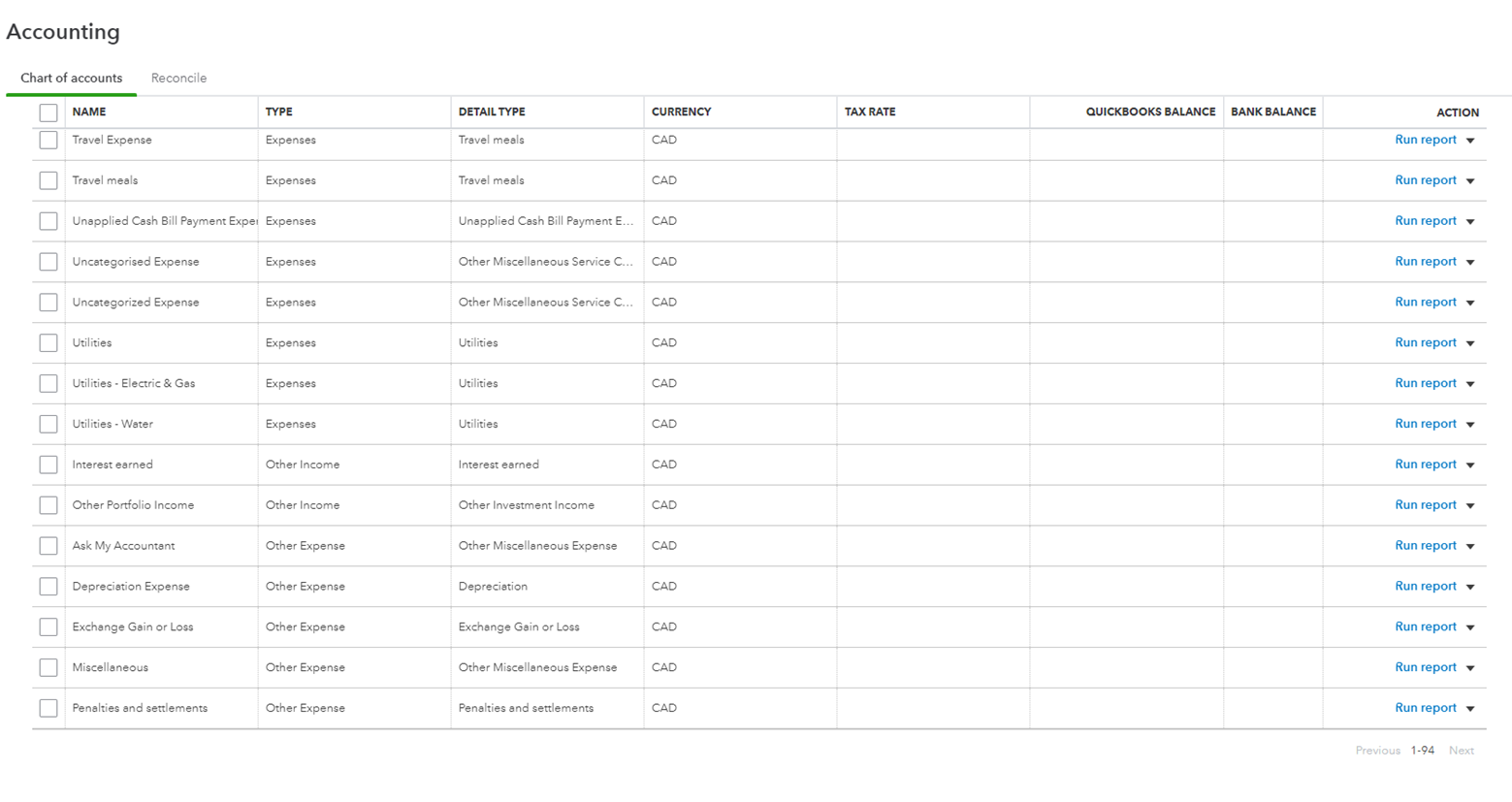
You'll want to have separate revenue accounts for each type of revenue you receive. For example, you would have a revenue account for your main revenue generating activity and another revenue account if you received interest from a savings account or term deposit.
A lot of expenses can be grouped together in one account like office expense. However, you may want to break out some expenses to better identify them. This is commonly done with vehicle expenses where repairs and maintenance, insurance, and fuel are separated into different accounts. It's best to keep the number of accounts to a minimum so if you don't need to separate expenses then they can be grouped into one account.
4. Schedule Time For Bookkeeping
To make sure you keep up with your bookkeeping, you should schedule time in your calendar each week or month. You will be more likely to do it if it's a part of your routine and you'll be able to regularly keep track of your business's performance. It also enables you to stay on top of your bank reconciliation, receivables, and payables.
When your weekly or monthly bookkeeping is complete you will have an up-to-date view of how your business is doing. This will allow you to make decisions and form strategies for your business as you move forward.
5. Invoice Clients And Keep On Top Of Receivables
This one is critical to keep on top of. Make sure client invoices are sent promptly and any outstanding receivables are sent payment reminders on a timely basis.
If you are using bookkeeping software to generate invoices, it will track your receivables and match them to the payments being received. When you do your bookkeeping each week or month then you can run a report to see any overdue receivables that need attention. Client reminders can be sent directly from the software making your job easier. You can also automate it so that clients with overdue invoices are automatically sent reminders once their invoice is overdue.
If you are tracking revenue and expenses in a spreadsheet you will need to keep track of clients that haven't paid and follow up with them. This is a bit more time consuming but your businesses cash flow is critical to your success.
6. Don't Forget About Deadlines
In addition to keeping up to date with your bookkeeping, you'll need to make sure Employer Health Tax (EHT), WCB, GST and PST returns are filed, source deductions are paid, and income taxes and instalments are all completed on time. Missing deadlines can be costly, you don't want your own bookkeeping to be more costly than hiring a professional.
7. Keep Your Receipts
Make sure you have a good routine for storing all of your receipts. You need to keep them for 7 years in the event that CRA comes asking for them. Having detailed records of your business expenses and keeping them separate from personal expenses could save you from having those expenses being denied as business expenses and having to pay more income tax.
You could use folders or envelopes to keep receipts separated by type and year. There are also programs such as Hubdoc and Dext that store electronic copies of all of the receipts you upload to your account. You can email or take photos of your receipts and invoices and send them directly to your account for storage.
Whichever way you choose, make sure they are stored in a safe place, and don't forget where you stored them.
8. Increase The Use Of Automation
The automation available for bookkeeping today is incredible. You can cut hours off your bookkeeping each month by implementing technology that can increase your efficiency.
We've discussed the bookkeeping software QBO and Xero as well as Hubdoc and Dext but the great thing is that they can work together. The receipts you save in Hubdoc and Dext can be sent to your QBO or Xero software and matched to the expense so that all of your expenses have your digital receipts attached to them.
9. Monitor Cash Flow
Monitoring cash flow can uncover areas of your business that may need attention. Cash flow can be affected by increasing receivables, changes in customer behaviour, increasing payables, and increasing inventory. It could also be because you operate in a cyclical industry where the majority of sales are earned during a specific period in the year.
This can give you insight into areas that need to be improved internally or externally. We've seen clients bring a full year of bookkeeping in to be done meaning they have no idea how their business was performing during that year, which makes it much harder to adapt to changes that are continuously occurring in their industry.
QuickBooks Online has a built in cash flow planner that uses your data to project your future cash flow. You can also add future events that will be cash inflows or outflows to see how they affect you cash flow.
10. Don't Forget About Business Expenses Paid With Cash
Although its easier to pay for expenses directly through the business bank or credit card account, it's sometimes more convenient to pay with cash. When cash is withdrawn from the business account and used to pay for business expenses, don't forget to keep the receipt and record it when doing your bookkeeping. You don't want to miss out on a deductible expense to help reduce your taxes.
11. Allocate Sales Tax Correctly
If you are registered for GST, you'll want to make sure you are recording and allocating GST collected on revenue and GST paid on expenses. If you are doing your bookkeeping regularly then you will be all set to file your GST return when it's due and you won't be trying to frantically catch up in order to file it on time.
If you have to file PST returns, then you only have to worry about recording the PST from each sale you make. There are no deductions for PST paid on expenses so the PST on your expenses just gets added to the expense account you are using for the purchase. You will get a small commission based on the dollar amount you collected each period.
12. Realize When It's Time To Hire A Bookkeeper
When you first start out your intentions are likely to save money while you build your business and increase revenue. However, as you become busier with your business and have less time to do the bookkeeping then things get missed, you do the bookkeeping less frequently and just fall behind and you are running your business blind and not seeing how your business is doing financially. If the bookkeeping is incomplete or done incorrectly your accountant will spend longer on the file to sort through transactions, thus increasing your fees.
Conclusion
By following these tips, you can reduce the time you spend on your bookkeeping and have a clear and concise reports such as balance sheet, income statement, and trial balance to review each month.
They will also help reduce stress as well as free up your time.
Visit our bookkeeping services and plans pages to learn more about how we can assist you in reaching your goals. They provide an overview of our services, including information on the benefits and features of each. Feel free to contact us if you have any questions about our services.
Disclaimer
The author takes reasonable care to make sure the information on this blog is complete at the time it was posted. The information may not be comprehensive or current and is provided for general information purposes only.
This blog is not meant to be used as an alternative to professional advice. You should always consult with a professional to obtain advice on your specific situation.
Kevin Rattray CPA Inc. is not affiliated, associated, authorized, endorsed by, or in any way officially connected with any of the software recommended in this blog.